
Close Menu
Beverly Hills Examiner

    Subscribe to Updates

    Get the latest creative news from FooBar about art, design and business.

    What's Hot

    Bring on 2027 I mean 2026 I mean Happy Easter

    December 31, 2025

    ‘I opened her door and the wind caught me, and I went flying’: The U.S. Arctic air surge is sweeping northerners off their feet

    December 31, 2025

    The Trump Regime Threatens Artists As The Kennedy Center Will Be Empty On New Year’s Eve

    December 31, 2025
    Facebook X (Twitter) Instagram
    Beverly Hills Examiner
    • Home
    • US News
    • Politics
    • Business
    • Science
    • Technology
    • Lifestyle
    • Music
    • Television
    • Film
    • Books
    • Contact
      • About
      • Amazon Disclaimer
      • DMCA / Copyrights Disclaimer
      • Terms and Conditions
      • Privacy Policy
    Beverly Hills Examiner
    Home»US News»New Gmail tool makes it easy to unsubscribe from emails in bulk
    US News

    New Gmail tool makes it easy to unsubscribe from emails in bulk

    By AdminJuly 15, 2025
    Facebook Twitter Pinterest LinkedIn WhatsApp Email Reddit Telegram
    New Gmail tool makes it easy to unsubscribe from emails in bulk


    NEWYou can now listen to Fox News articles!

    Are you drowning in promotional emails? Google has just made it easier than ever to regain control of your inbox with Gmail’s new Manage Subscriptions tool. This powerful feature lets you unsubscribe from dozens of mailing lists in just a few clicks, no more opening each email one by one or risking your privacy with sketchy unsubscribe links. Let’s dive into how this tool works, how you can use it, and why it’s a game-changer for anyone who wants a cleaner, more manageable Gmail inbox.

    Sign up for my FREE CyberGuy Report
    Get my best tech tips, urgent security alerts, and exclusive deals delivered straight to your inbox. Plus, you’ll get instant access to my Ultimate Scam Survival Guide – free when you join. my CYBERGUY.COM/NEWSLETTER.

    Illustration of a woman using Gmail’s ‘Manage Subscriptions’ tool. (Google)

    How Gmail’s ‘Manage Subscriptions’ tool works

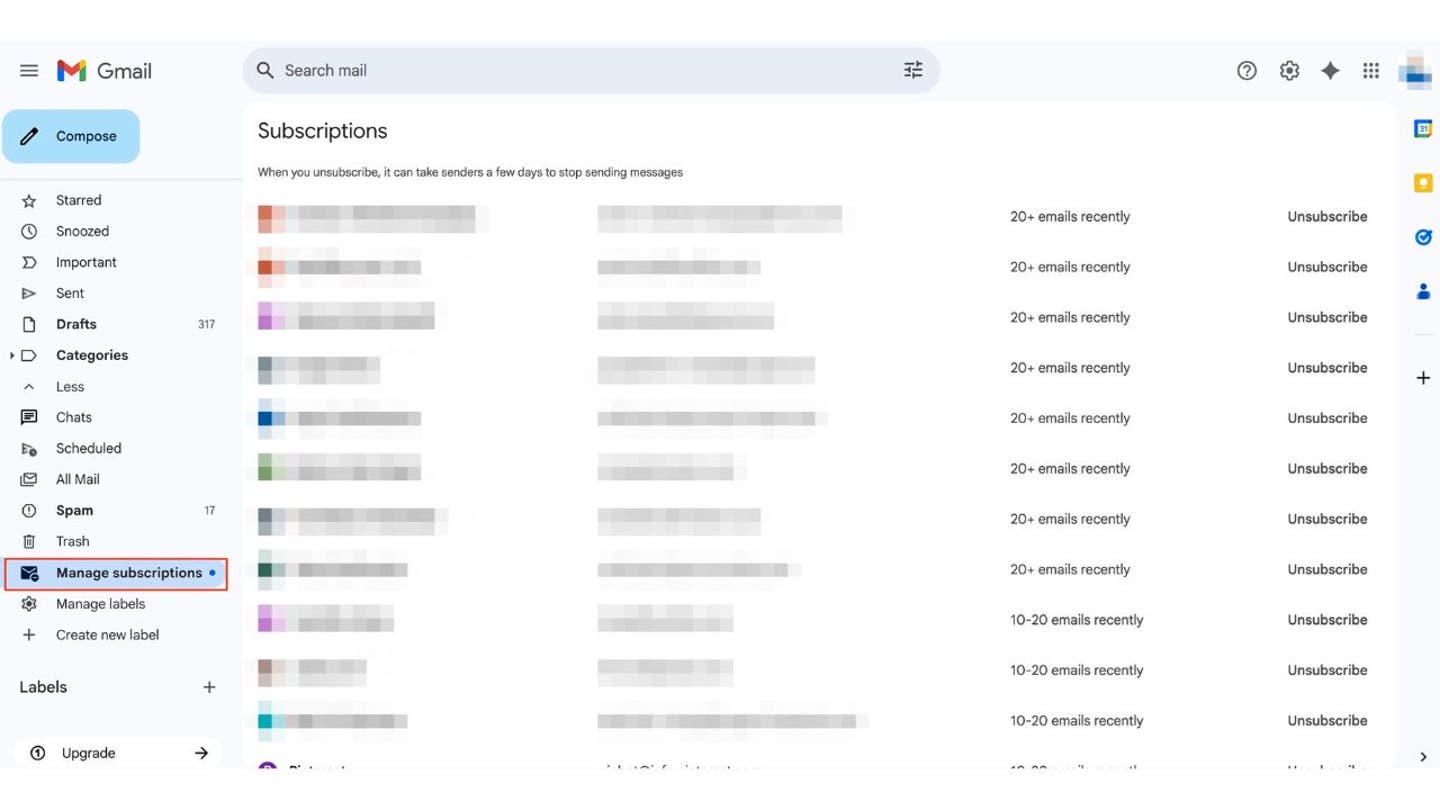
    Recently, Google expanded its Android unsubscribe feature to Gmail’s desktop version, introducing a new “Manage Subscriptions” button. This feature compiles every email list you’re subscribed to, showing the sender’s name, email address, and how many messages you’ve received recently, all in one convenient place. With just a click, you can unsubscribe from any or all of these lists without leaving the page. The tool offers several key benefits. You can quickly unsubscribe from dozens of mailing lists in just a few seconds.

    All of your active subscriptions are displayed on a single page, so there’s no need to hunt through your inbox or open individual emails. It’s also safer, as it avoids the risks of clicking on unknown or potentially malicious unsubscribe links found in some messages.

    Gmail’s Manage Subscriptions tool also provides a secure and convenient way to reduce inbox clutter without depending on third-party services. Unlike those apps, Gmail’s feature doesn’t ask for access to your inbox, helping protect your personal data. It’s built directly into Gmail, works with your current setup, and doesn’t require any extra downloads or paid plans. In some cases, you may still need to visit a sender’s website to complete the unsubscribe process, and Gmail will give you options like “Go to website” or “Block” on mobile.

    The new “Manage subscriptions” tool is being gradually released across the web, iOS and Android, so if it’s not visible yet, it should appear soon.

    How to use Gmail’s bulk unsubscribe feature on web, Android, and iOS

    1) Access the “Manage Subscriptions” page

    On Web (Desktop):

    • Open Gmail in your browser.
    • In the left sidebar, scroll down and click More.
    • Select Manage subscriptions.

    Gmail’s “Manage Subscriptions” page on desktop. (Kurt “CyberGuy” Knutsson)

    On mobile (Android or iOS):

    • Open the Gmail app.
    • Tap the menu icon (three horizontal lines) in the top-left corner.
    • Scroll down and tap Manage subscriptions.
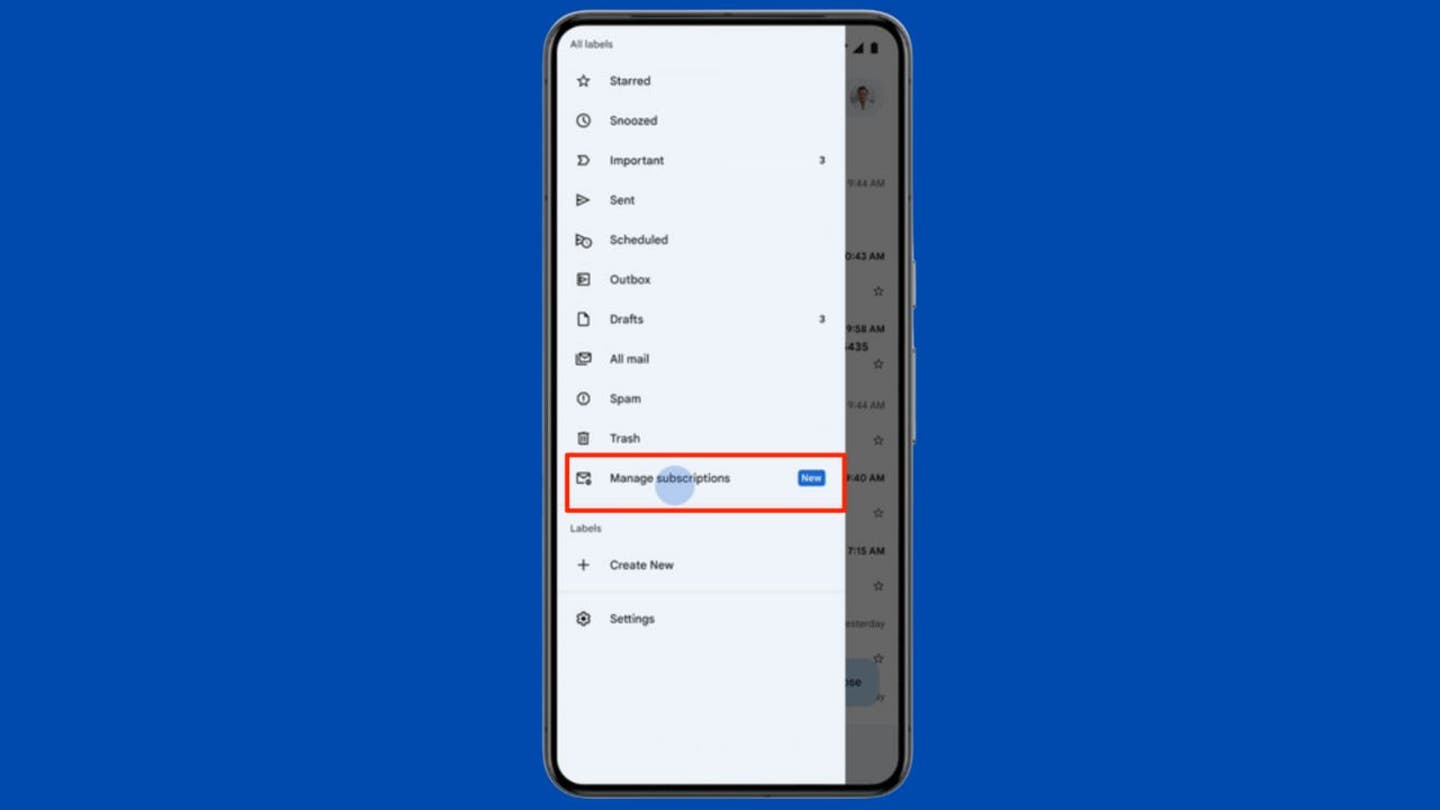
    Gmail’s “Manage Subscriptions” page on mobile. (Kurt “CyberGuy” Knutsson)

    2) Review your subscriptions

    You will see a list of all the senders you are subscribed to, including their email addresses and the number of recent messages they have sent. 

    3) Unsubscribe in bulk

    • Next to each sender, tap or click the Unsubscribe button.
    • Confirm the unsubscribe request if prompted.
    • Repeat for as many subscriptions as you want to remove, all from this single dashboard.

    If you want to review emails from a sender before unsubscribing, tap/click the sender’s name to view recent messages.
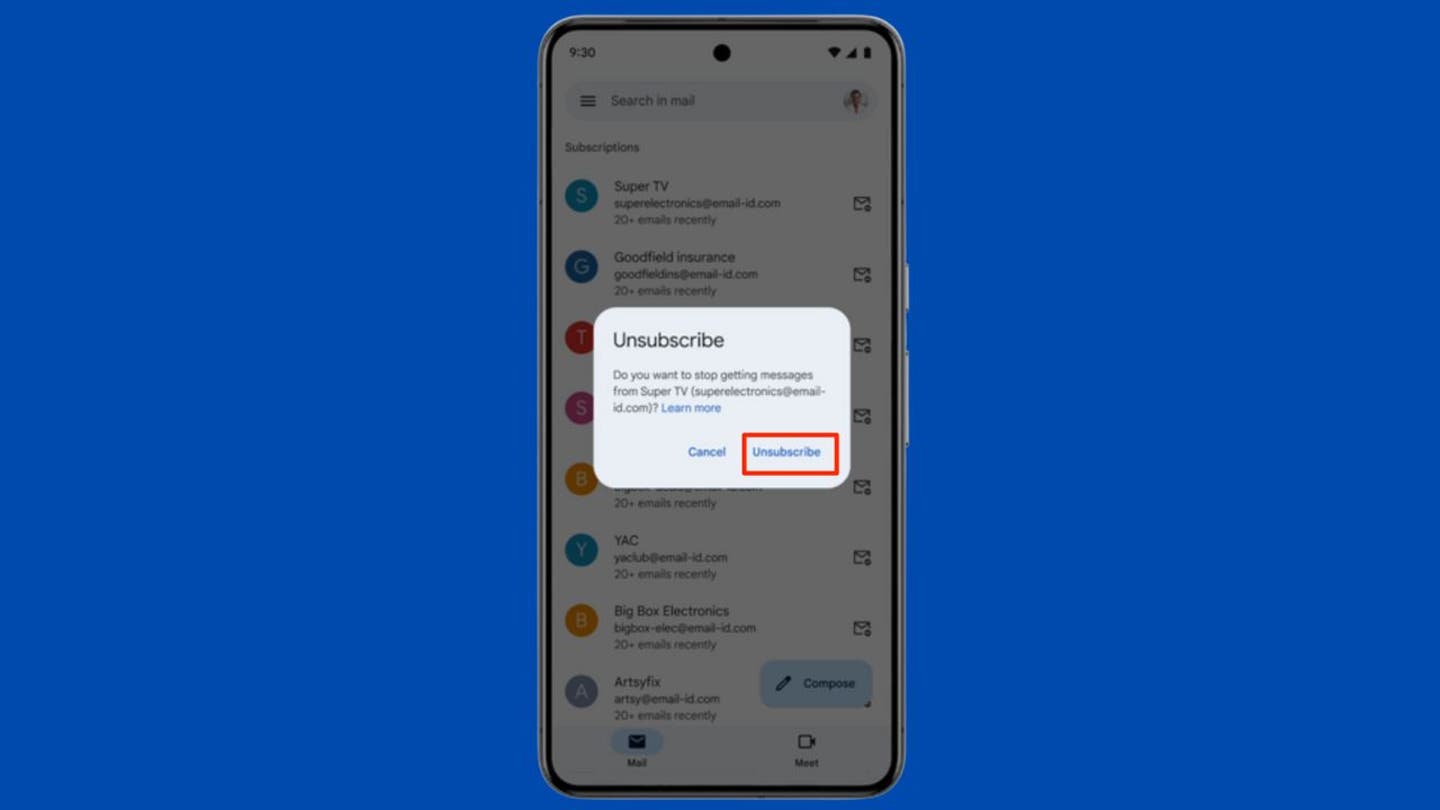
    Gmail’s “Manage Subscriptions” page on mobile. (Kurt “CyberGuy” Knutsson)

    4) Wait for changes to take effect

    Unsubscribe requests may take a few days to be fully processed. You might receive a few more emails from those senders before they stop.

    5 easy ways to keep your Gmail inbox clean

    Keeping your inbox under control doesn’t have to be a chore. With the right habits and tools, you can cut down on clutter, avoid scams, and stay focused on the messages that matter. Here are some simple but effective strategies: 

    1) Check your “Manage Subscriptions” page often

    Make a habit of visiting Gmail’s Manage Subscriptions page every few weeks. This tool shows you all the mailing lists you’re currently subscribed to and how frequently each sender contacts you. Unsubscribing from irrelevant or annoying lists only takes a click and helps prevent your inbox from being overrun with marketing emails.

    2) Use Gmail filters to automate cleanup

    Set up Gmail filters to automatically archive, label, or delete certain types of messages. For example, you can filter out promotional offers that arrive too often. This keeps your inbox focused without manually sorting through messages every day. 

    3) Be careful with unsubscribe links and use strong antivirus software

    Think twice before clicking on “unsubscribe” links in unfamiliar or suspicious emails. Some of these links are used in phishing attacks to confirm your email address or trick you into handing over personal information. If you’re unsure, it’s safer to use Gmail’s built-in tools instead.

    For Android devices, Google Play Protect offers built-in malware protection and can automatically remove known threats. However, it is important to note that Google Play Protect may not be enough. Historically, it isn’t 100% foolproof at removing all known malware from Android devices. That’s why it’s important to add a trusted antivirus app.

    The same goes for iPhones, Macs, and PCs. While Apple and Microsoft have built-in defenses, adding reputable antivirus software gives you extra layers of protection against phishing, ransomware, and other digital threats.

    To stay safer across all your devices, make sure you’re protected. 

    See my picks for the best antivirus protection of 2025 for Windows, Mac, Android, and iOS at CyberGuy.com/LockUpYourTech.

    4) Use a secondary email for signups

    Consider creating an alias email address for online shopping, newsletters, and one-time sign-ups. This keeps promotional messages out of your main inbox and makes it easier to manage subscriptions. By creating email aliases, you can protect your information and reduce spam. These aliases forward messages to your primary address, making it easier to manage incoming communications and avoid data breaches.

    For recommendations on private and secure email providers that offer alias addresses, visit Cyberguy.com/Mail.

    5) Mark spam instead of deleting

    When you receive an unwanted email, don’t just delete it, mark it as spam. Gmail uses this feedback to improve its filtering system and automatically catch similar messages in the future. This helps protect not only your inbox, but other users’ too.

    Kurt’s key takeaways

    Gmail’s new Manage Subscriptions tool is a long-awaited upgrade for anyone tired of inbox overload. With the ability to see all your subscriptions in one place and unsubscribe in bulk, you can reclaim your inbox, and your attention, in just a few minutes. If you haven’t spotted the feature yet, keep an eye out as Google continues to roll it out to more users. In the meantime, enjoy a cleaner, more focused email experience, one click at a time.

    Would you welcome more automation in email management, or do you prefer a hands-on approach? Let us know by writing us at Cyberguy.com/Contact.

    Sign up for my FREE CyberGuy Report
    Get my best tech tips, urgent security alerts, and exclusive deals delivered straight to your inbox. Plus, you’ll get instant access to my Ultimate Scam Survival Guide – free when you join. my CYBERGUY.COM/NEWSLETTER.

    Copyright 2025 CyberGuy.com. All rights reserved. 

    Kurt “CyberGuy” Knutsson is an award-winning tech journalist who has a deep love of technology, gear and gadgets that make life better with his contributions for Fox News & FOX Business beginning mornings on “FOX & Friends.” Got a tech question? Get Kurt’s free CyberGuy Newsletter, share your voice, a story idea or comment at CyberGuy.com.


    Original Source Link

    Share. Facebook Twitter Pinterest LinkedIn WhatsApp Email Reddit Telegram
    Previous ArticleNZXT Discount Codes: 50% Off
    Next Article New Poll Finds Trump’s Immigration Policies Still Strongly Supported by the American People | The Gateway Pundit

    RELATED POSTS

    Treat yourself: Save up to 50% on tech from Apple, Bose and more

    December 31, 2025

    Obamacare subsidies to expire after Congress failed to extend or replace them

    December 30, 2025

    Rob and Michele Reiner death reports sealed by Los Angeles court order

    December 30, 2025

    Minnesota faces potential $9 billion fraud scandal under Democrat Gov. Tim Walz

    December 29, 2025

    49ers stave off Bears’ comeback hopes, have No. 1 seed in sights for Week 18

    December 29, 2025

    NFL news: Maxx Crosby ‘not happy’ with Raiders over IR move, insider says

    December 28, 2025
    latest posts

    Bring on 2027 I mean 2026 I mean Happy Easter

    Liam Gallagher has stoked rumours by teasing possible Oasis activity for next year. Earlier this month, the frontman appeared to confirm that the band would…

    ‘I opened her door and the wind caught me, and I went flying’: The U.S. Arctic air surge is sweeping northerners off their feet

    December 31, 2025

    The Trump Regime Threatens Artists As The Kennedy Center Will Be Empty On New Year’s Eve

    December 31, 2025

    Treat yourself: Save up to 50% on tech from Apple, Bose and more

    December 31, 2025

    The phone is dead. Long live . . . what exactly?

    December 31, 2025

    Star that seemed to vanish more than 130 years ago is found again

    December 31, 2025

    Bowie: The Final Act review – revisiting the…

    December 31, 2025
    Categories
    • Books (968)
    • Business (5,876)
    • Film (5,810)
    • Lifestyle (3,913)
    • Music (5,878)
    • Politics (5,880)
    • Science (5,222)
    • Technology (5,809)
    • Television (5,495)
    • Uncategorized (2)
    • US News (5,861)
    popular posts

    New Idaho student murders Judge Steven Hippler takes Bryan Kohberger case

    Join Fox News for access to this content Plus special access to select articles and…

    ‘Anchorman’ actor David Koechner arrested after failed field sobriety test in Ohio: bodycam footage

    June 15, 2022

    NASA Will Not Change the James Webb Telescope’s Name

    November 19, 2022

    MTV Awards 2022 Winners: Full List — Best TV Shows & Movies

    June 6, 2022
    Archives
    Browse By Category
    • Books (968)
    • Business (5,876)
    • Film (5,810)
    • Lifestyle (3,913)
    • Music (5,878)
    • Politics (5,880)
    • Science (5,222)
    • Technology (5,809)
    • Television (5,495)
    • Uncategorized (2)
    • US News (5,861)
    About Us

    We are a creativity led international team with a digital soul. Our work is a custom built by the storytellers and strategists with a flair for exploiting the latest advancements in media and technology.

    Most of all, we stand behind our ideas and believe in creativity as the most powerful force in business.

    What makes us Different

    We care. We collaborate. We do great work. And we do it with a smile, because we’re pretty damn excited to do what we do. If you would like details on what else we can do visit out Contact page.

    Our Picks

    Star that seemed to vanish more than 130 years ago is found again

    December 31, 2025

    Bowie: The Final Act review – revisiting the…

    December 31, 2025

    ’90 Day Fiance’ Debbie Johnson Shares Devastating Family Death

    December 31, 2025
    © 2025 Beverly Hills Examiner. All rights reserved. All articles, images, product names, logos, and brands are property of their respective owners. All company, product and service names used in this website are for identification purposes only. Use of these names, logos, and brands does not imply endorsement unless specified. By using this site, you agree to the Terms & Conditions and Privacy Policy.

    Type above and press Enter to search. Press Esc to cancel.

    We use cookies on our website to give you the most relevant experience by remembering your preferences and repeat visits. By clicking “Accept All”, you consent to the use of ALL the cookies. However, you may visit "Cookie Settings" to provide a controlled consent.
    Cookie SettingsAccept All
    Manage consent

    Privacy Overview

    This website uses cookies to improve your experience while you navigate through the website. Out of these, the cookies that are categorized as necessary are stored on your browser as they are essential for the working of basic functionalities of the website. We also use third-party cookies that help us analyze and understand how you use this website. These cookies will be stored in your browser only with your consent. You also have the option to opt-out of these cookies. But opting out of some of these cookies may affect your browsing experience.
    Necessary
    Always Enabled
    Necessary cookies are absolutely essential for the website to function properly. These cookies ensure basic functionalities and security features of the website, anonymously.
    CookieDurationDescription
    cookielawinfo-checkbox-analytics11 monthsThis cookie is set by GDPR Cookie Consent plugin. The cookie is used to store the user consent for the cookies in the category "Analytics".
    cookielawinfo-checkbox-functional11 monthsThe cookie is set by GDPR cookie consent to record the user consent for the cookies in the category "Functional".
    cookielawinfo-checkbox-necessary11 monthsThis cookie is set by GDPR Cookie Consent plugin. The cookies is used to store the user consent for the cookies in the category "Necessary".
    cookielawinfo-checkbox-others11 monthsThis cookie is set by GDPR Cookie Consent plugin. The cookie is used to store the user consent for the cookies in the category "Other.
    cookielawinfo-checkbox-performance11 monthsThis cookie is set by GDPR Cookie Consent plugin. The cookie is used to store the user consent for the cookies in the category "Performance".
    viewed_cookie_policy11 monthsThe cookie is set by the GDPR Cookie Consent plugin and is used to store whether or not user has consented to the use of cookies. It does not store any personal data.
    Functional
    Functional cookies help to perform certain functionalities like sharing the content of the website on social media platforms, collect feedbacks, and other third-party features.
    Performance
    Performance cookies are used to understand and analyze the key performance indexes of the website which helps in delivering a better user experience for the visitors.
    Analytics
    Analytical cookies are used to understand how visitors interact with the website. These cookies help provide information on metrics the number of visitors, bounce rate, traffic source, etc.
    Advertisement
    Advertisement cookies are used to provide visitors with relevant ads and marketing campaigns. These cookies track visitors across websites and collect information to provide customized ads.
    Others
    Other uncategorized cookies are those that are being analyzed and have not been classified into a category as yet.
    SAVE & ACCEPT