
NEWYou can now listen to Fox News articles!
Spam is annoying and can sometimes be dangerous if it’s part of a widespread phishing attack. When you see spam, you delete it, at least that’s what conventional wisdom suggests. However, it now seems that this is the wrong approach, and spam can be used for the greater good.
So, before you delete that junk email, consider keeping it to protect others from scammers. We will also tell you what you should do with them instead.
Sign up for my FREE CyberGuy Report
Get my best tech tips, urgent security alerts, and exclusive deals delivered straight to your inbox. Plus, you’ll get instant access to my Ultimate Scam Survival Guide – free when you join my CyberGuy.com/Newsletter
Mail app icon on iPhone (Kurt “CyberGuy” Knutsson)
Why should you keep those spam emails?
We know this sounds counter-intuitive, but keeping spam emails, at least for a short while, serves an important purpose. Your email provider can use them to refine their spam detection algorithms. The best course of action is to report them, so providers can develop better ways to identify harmful or unwanted messages. This will improve their chances of detecting them before they hit your inbox. Deleting these emails makes them useless to anyone. Furthermore, your failure to contribute to this improvement means the problem persists not only for you but for others.
When we say “a short while,” we don’t mean forever. Usually, keeping them in your junk folder for a few days to a week is enough for your provider to process and learn from them. After you’ve reported the spam or phishing attempt, you can safely delete it.
That’s the surprising reason not to delete spam emails right away: by holding onto and reporting them briefly, you’re helping email providers spot and block scams faster—protecting not just yourself, but everyone else too.
AI-POWERED SCAM TARGETS 2.5 BILLION GMAIL USERS IN SOPHISTICATED PHISHING ATTACKS
How to report spam emails to your email provider
These algorithms that detect junk emails are already getting smarter. Just check your Spam folder, and you may have dozens of emails marked as spam that they have shielded you from. For those that slip through the cracks and appear in your inbox, reporting them is easy.
Whether you’re using a desktop client like Microsoft Outlook or a web client like Gmail, Yahoo or AOL, the steps to report spam for analysis are similar.
Report spam in Gmail (desktop or web)
- Select the spam email by ticking the checkbox on its left side. You can select more than one.
- Click Report spam in the top menu. Look for a stop sign or shield icon.
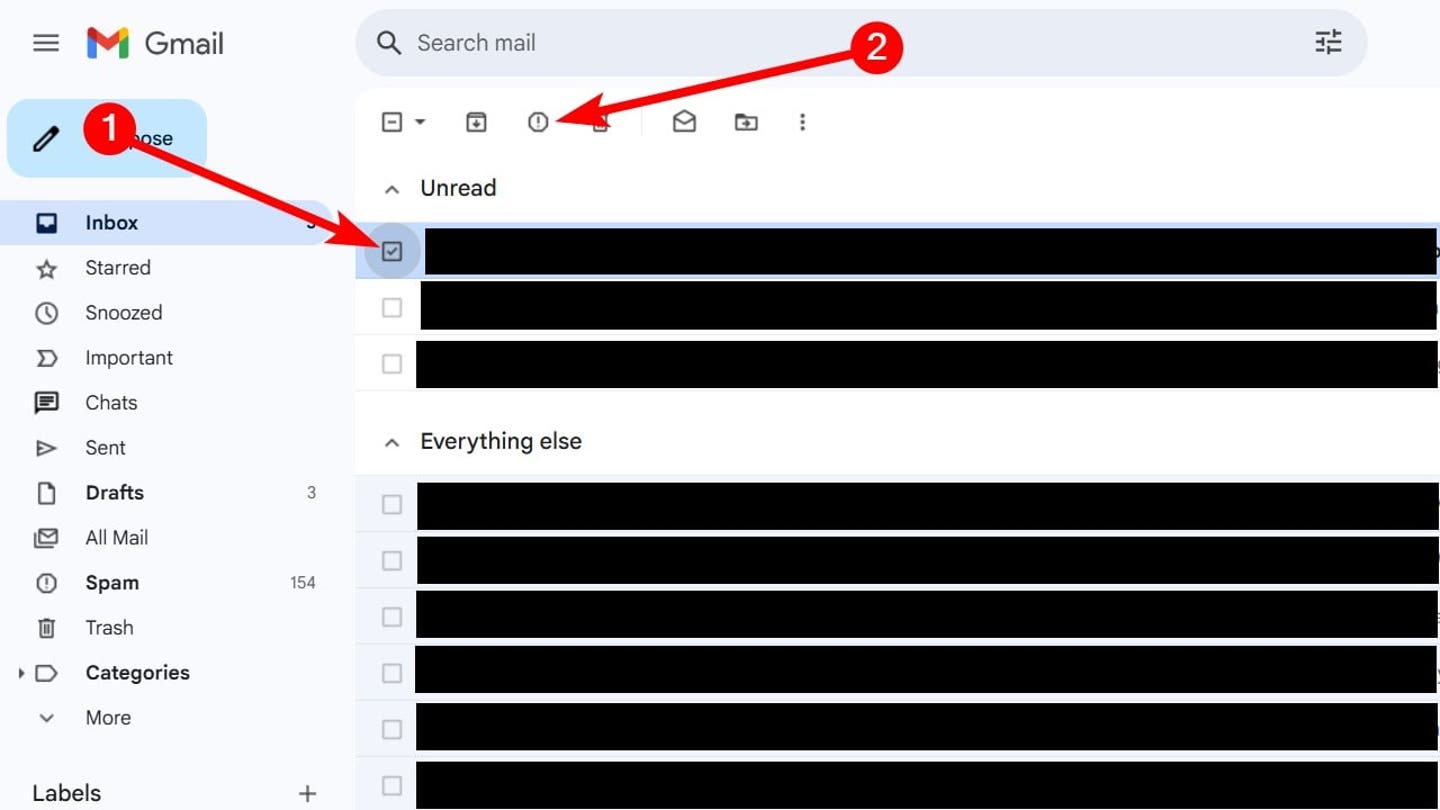
How to report spam emails in Gmail in your inbox
Report scam in iCloud (desktop browser)
If you’re using something like iCloud Mail on iCloud.com on a desktop browser, do the following:
- Open the email.
- Click the three-dot icon in the top menu.
- Select Move Message to Junk.
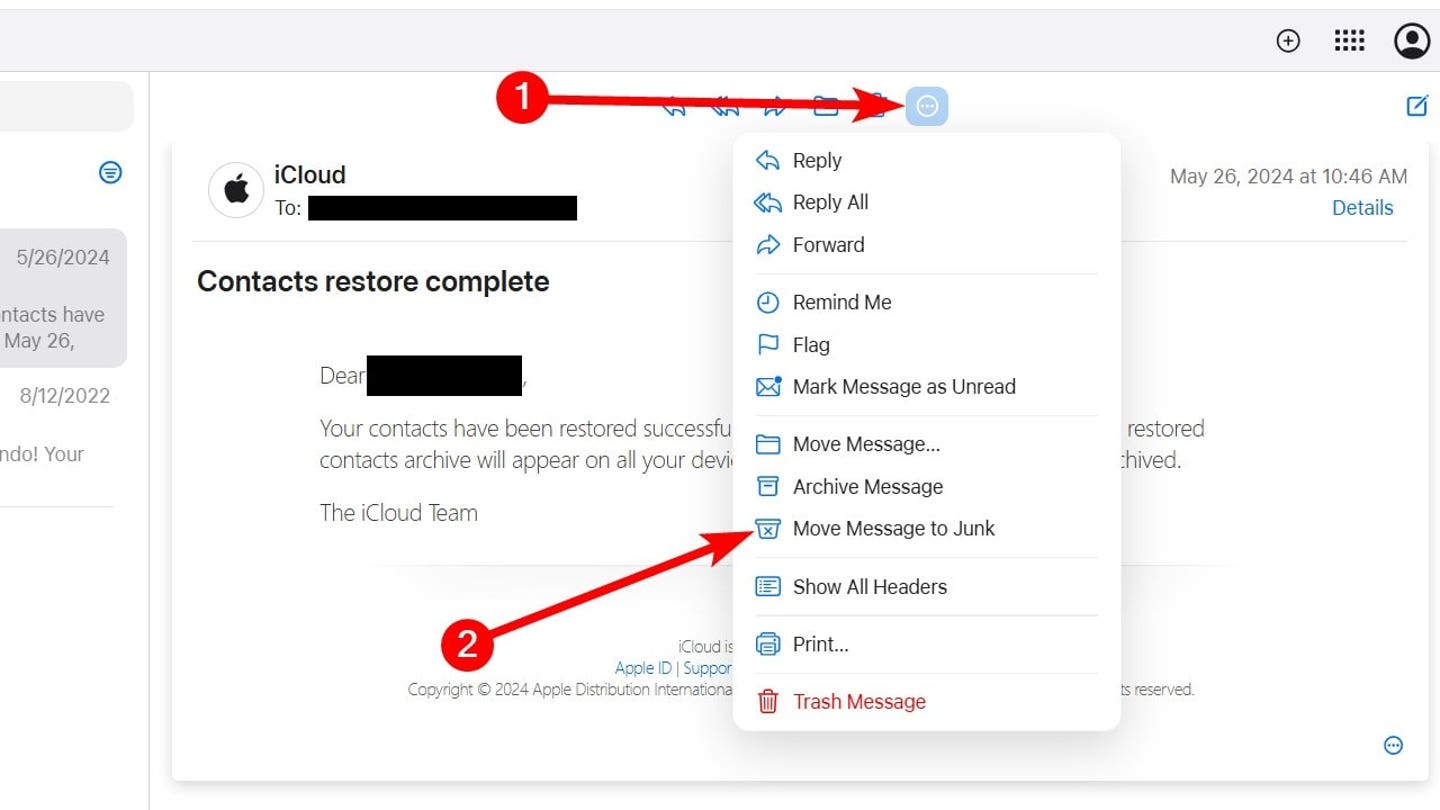
How to report spam on iCloud.com in your inbox (Kurt “CyberGuy” Knutsson)
Report spam in iCloud Mail (iPhone or iPad Mail app, iOS 18.6)
If you’re using the Mail app on an iPhone or iPad, follow these steps instead:
- Open the email in the Mail app.
- Tap the reply arrow icon at the bottom of the screen.
- Select Move to Junk from the menu.
Report spam in Yahoo Mail
On the web (desktop version):
- Tick the checkbox next to the unwanted email(s) in your inbox.
- Click Spam in the toolbar above. This moves the message to your Spam folder and helps Yahoo learn to catch similar messages.
- You can also open the email directly and click Spam to report it.
On the Yahoo Mail mobile app (iOS/Android):
- Open the message.
- Tap the three vertical dots or “More” icon.
- Choose Mark as Spam to report it.
Report spam or phishing in Outlook / Outlook.com
In Outlook on the web (Outlook.com):
- Select the message(s) you want to report.
- Click Report above the reading pane, then choose Report phishing or Report junk from the dropdown.
In desktop Outlook (Windows, Mac) or Outlook mobile:
- If you’re using a supported version (like Outlook for Microsoft 365, Outlook for Mac 16.89+ or recent mobile versions), you’ll see a Report button on the toolbar.
- Select the message(s), click Report and then choose Phishing or Junk.
Report spam in AOL Mail
On the web or desktop:
- Log into AOL Mail and select the spam email from your inbox.
- Click the Spam button—often shown as an exclamation mark or explicitly labeled “Spam.” This moves the email to your Spam folder and helps train AOL’s filters.
On mobile:
In the AOL Mail app, you can usually tap and hold or open the message and select Mark as Spam from the options to report it.
How to report deleted spam mail
Even for those spam emails you deleted, they’re not gone forever. If it’s been less than 30 days, they’re probably still in the Trash folder.
To report them to clients like Gmail, Outlook, Yahoo, and AOL, follow these steps:
- Open the Trash or Deleted items folder in your mail client.
- Select the spam email by ticking the checkbox on its left side.
- Click Report spam in the top menu. Look for a stop sign or shield icon.
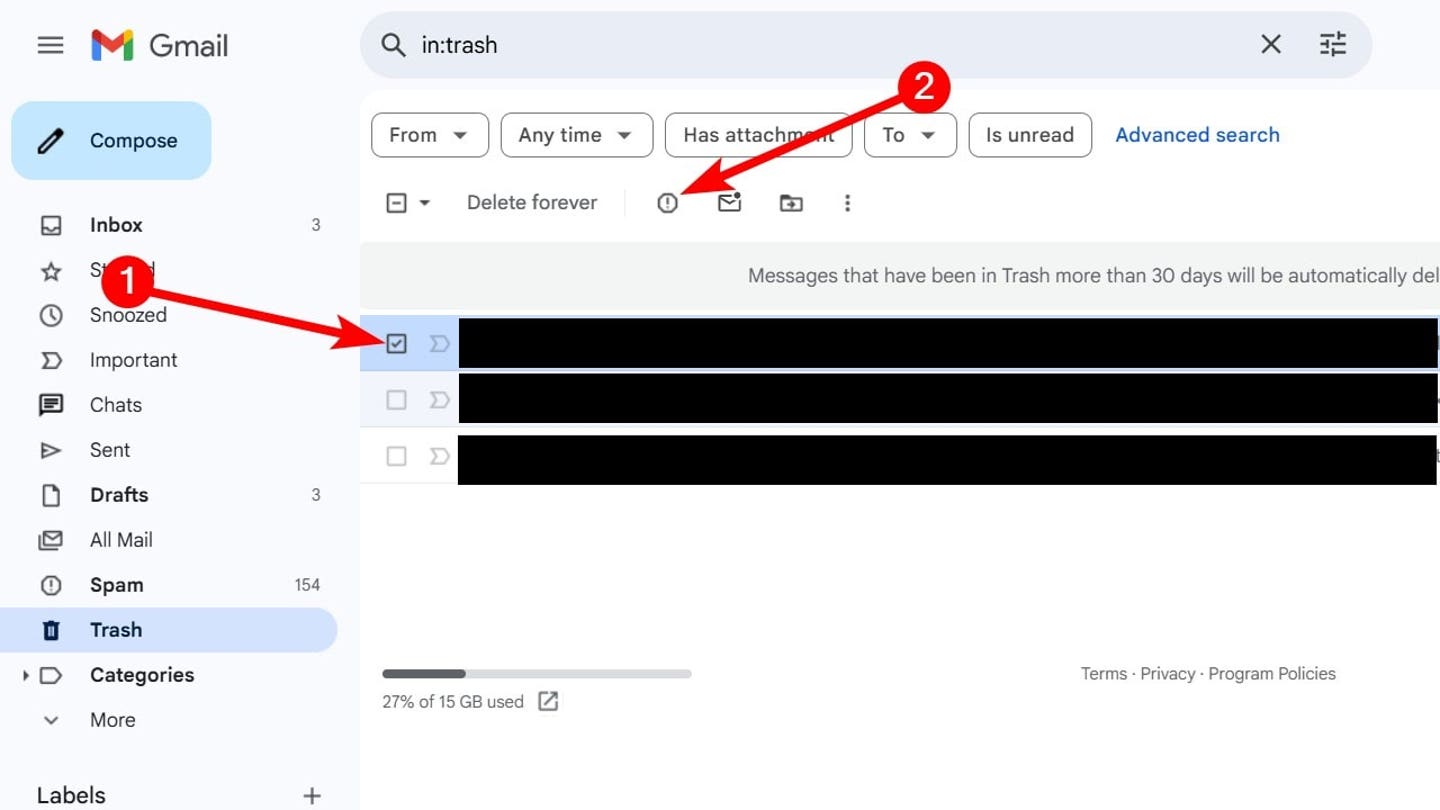
How to report spam in Gmail when it’s in the trash folder
You make yourself a target when you unsubscribe
Some spam emails also come with an option to unsubscribe. If you think reporting is too harsh, you might think unsubscribing is the best option to stop the spam emails from coming back. However, this can make matters worse. The act of unsubscribing signals to scammers and spammers that you’re actively checking your email. This emboldens them to increase the volume of spam they send. Worse still, some unsubscribe links are malicious traps designed to steal personal information or distribute malware.
GOOGLE SHUTS DOWN SOPHISTICATED GOOGLE DOCS PHISHING SCAM
Tips to stay safe from spam
Reporting spam helps your email provider protect you and others, but you can take additional steps to keep your inbox and personal information safe.
1) Never click suspicious links and use strong antivirus software
Even if an email appears to come from a company you trust, avoid clicking links unless you’re sure they’re legitimate. Phishing scams often use convincing logos and language to trick you into revealing sensitive information.
The best way to safeguard yourself from malicious links that install malware, potentially accessing your private information, is to have antivirus software installed on all your devices. This protection can also alert you to phishing emails and ransomware scams, keeping your personal information and digital assets safe.
Get my picks for the best 2025 antivirus protection winners for your Windows, Mac, Android & iOS devices at CyberGuy.com/LockUpYourTech
2) Use a personal data protection service
Consider using a service that monitors the dark web for your personal information and requests the removal of exposed data. This reduces the chances of scammers targeting you in the first place. While no service can guarantee the complete removal of your data from the internet, a data removal service is really a smart choice. They aren’t cheap — and neither is your privacy. These services do all the work for you by actively monitoring and systematically erasing your personal information from hundreds of websites. It’s what gives me peace of mind and has proven to be the most effective way to erase your personal data from the internet. By limiting the information available, you reduce the risk of scammers cross-referencing data from breaches with information they might find on the dark web, making it harder for them to target you.
Check out my top picks for data removal services and get a free scan to find out if your personal information is already out on the web by visiting CyberGuy.com/Delete
Get a free scan to find out if your personal information is already out on the web: CyberGuy.com/FreeScan
3) Use private email providers and aliases
One of the smartest ways to cut down on spam is by using a private, secure email provider. These services prioritize privacy, don’t sell your data and offer stronger protection against trackers hidden in emails.
Another powerful feature is the ability to create email aliases. An alias is a throwaway address that forwards mail to your real inbox. You can use one when online shopping or using trial accounts. If that alias starts getting flooded with junk, you simply disable or delete it, without exposing your main address.
By using aliases and secure providers, you take back control of your inbox. Spammers can’t easily tie unwanted emails to your real account and your personal email remains far more private.
For recommendations on private and secure email providers that offer alias addresses, visit CyberGuy.com/Mail
4) Use strong, unique passwords
Create long, complex passwords that are different for every account. A password manager can store them securely and help you generate new ones that are hard to crack.
Next, see if your email has been exposed in past breaches. Our #1 password manager (see Cyberguy.com/Passwords) pick includes a built-in breach scanner that checks whether your email address or passwords have appeared in known leaks. If you discover a match, immediately change any reused passwords and secure those accounts with new, unique credentials.
Check out the best expert-reviewed password managers of 2025 at CyberGuy.com/Passwords
5) Enable two-factor authentication (2FA)
Turn on 2FA whenever possible. Even if a scammer gets your password, they won’t be able to log in without the second verification step.
6) Keep your devices updated
Install the latest software updates on your phone, tablet, and computer. These updates often include security patches that fix vulnerabilities scammers could exploit.
7) Be cautious with email attachments
Avoid opening attachments from senders you don’t recognize. They can contain viruses, ransomware or other types of malware designed to steal your data.
8) Limit the information you share online
The less personal information available about you publicly, the harder it is for scammers to craft convincing phishing emails that appear legitimate.
By following these steps and regularly reporting spam, you’ll protect not only your own inbox but also contribute to a safer online environment for everyone.
CLICK HERE TO GET THE FOX NEWS APP
Kurt’s key takeaways
Spam emails are annoying, but deleting them right away isn’t always the best move. By holding on to them and reporting them, you help your email provider improve its filters and block more junk in the future. At the same time, learn how to protect yourself from phishing attempts so you can recognize the warning signs quickly. With a little awareness and the right tools, spotting and avoiding these scams becomes much easier.
Have you ever had a close call with a spam or phishing email? Let us know by writing to us at CyberGuy.com/Contact
Sign up for my FREE CyberGuy Report
Get my best tech tips, urgent security alerts, and exclusive deals delivered straight to your inbox. Plus, you’ll get instant access to my Ultimate Scam Survival Guide — free when you join my CyberGuy.com/Newsletter
Copyright 2025 CyberGuy.com. All rights reserved.